
Can the Same Design Be Printed on Different T-Shirt Colours?
Learn when one design can work across mixed T-shirt colours, what must change for contrast, and how to approve and price each garment colour.
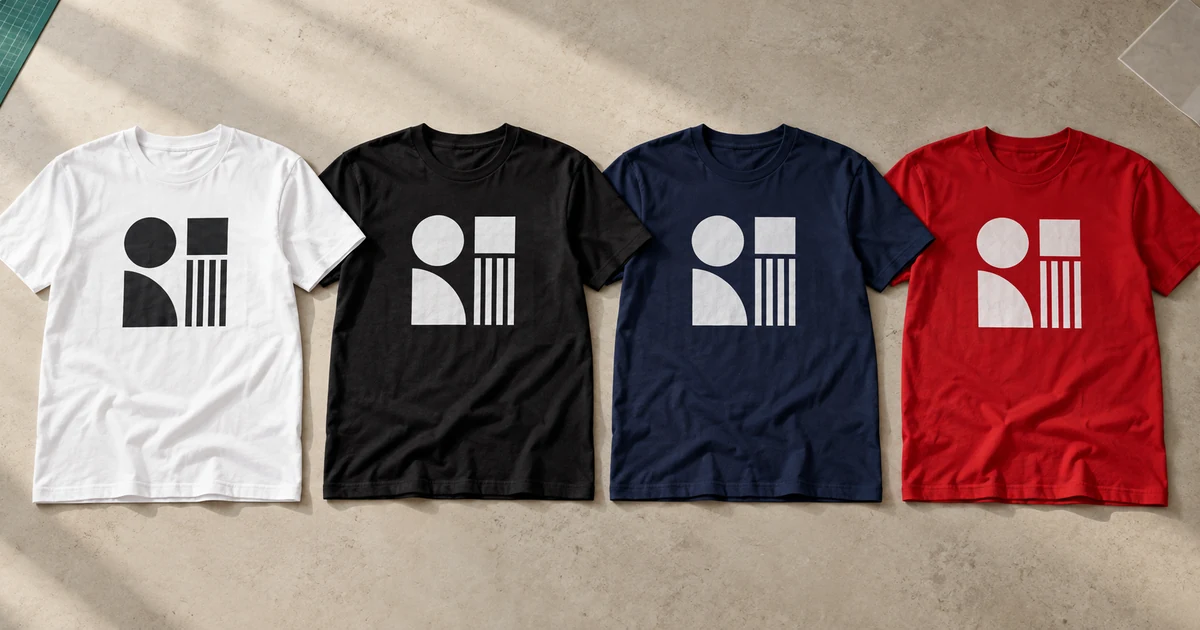
The short answer: yes, the same design can be printed on different T-shirt colours, but the same layout does not always use the same production recipe. Keep the design size and position consistent, then approve a light-garment and dark-garment colourway, underbase, print method and physical sample for every fabric-colour group.
Do not send a printer one mockup labelled “assorted colours”. A black shirt, white shirt and red polyester jersey can change the design’s contrast, ink construction, heat response and price even when the artwork looks identical on screen.
Separate the master design from its approved colourways
Start with one master artwork that fixes:
- logo or illustration shape and proportions;
- final print width and height;
- placement measurements from the collar, seam or centre line;
- text, spelling and line thickness;
- transparent and intentionally unprinted areas; and
- any elements that must never be recoloured.
Then define the smallest set of approved colourways. A practical order may need only:
- light-garment version: dark artwork on white, cream or pale grey;
- dark-garment version: white or light artwork on black and navy; and
- brand-colour exception: a backing shape or approved alternate colour for a garment that conflicts with the normal logo.
This is still one design system, not permission for the printer to choose a different colour on every shirt. Name each file and mockup clearly, such as front-logo-light-shirts and front-logo-dark-shirts, and record which garment colours use each version.
The artwork file guide explains when a vector file is preferable and why a transparent PNG must have enough resolution at final print size.
Use contrast before choosing the printing method
Ask one simple question for every combination: can every important edge and letter still be recognised at the intended viewing distance?
| Garment group | Common artwork decision | What to inspect |
|---|---|---|
| White or very light | Dark or full-colour version may work without a heavy white base | Pale yellow, white and transparent details disappearing |
| Black or dark | Light colourway, opaque ink or white underbase may be needed | Black shadows, thin outlines and dark brand colours merging into the shirt |
| Bright red, royal blue or green | Use an approved high-contrast version or backing shape | Garment colour shifting the apparent print colour or competing with the design |
| Heather or textured blend | Keep fine detail and semi-transparency under control | Fibres and texture showing through the print |
| Coloured polyester or dry-fit | Test the correct low-temperature or bleed-resistant system | Dye migration, press marks and colour contamination |
Do not use the shirt colour as an artwork colour by accident. A transparent hole that looks white on a white mockup becomes black on a black shirt. That can be a deliberate knockout effect, but it must be approved as part of each colourway.
Printful’s technical explanation of a white underbase notes that coloured or dark material can dull or alter partially transparent inks. Its purpose is to create a neutral foundation so the printed colours remain visible. The exact construction still depends on the method and supplier.
Different methods handle garment colour differently
| Method | Can the layout stay the same? | What may change between shirt colours? |
|---|---|---|
| Silk screen | Usually, when dimensions and positions stay fixed | Underbase screen, ink sequence, opacity, flash steps and sometimes the approved ink colour |
| DTF | Often | White layer, transfer recipe, film nesting, fabric compatibility and bleed blocker |
| DTG | Often | Pretreatment, white underbase, print profile and curing conditions |
| Heat-transfer vinyl | Often for a simple solid design | Vinyl colour or material, cutting file grouping and fabric-specific press settings |
| Dye sublimation | Only within suitable light polyester products | Dark garments normally need a different decoration process because standard sublimation has no white ink |
Roland DG’s DTF media guidance distinguishes a dark-garment profile with a heavy white layer from a light-garment profile with a lighter white layer. That is a useful reminder that one visible design can still have different production data underneath it.
For dye sublimation, Epson states that the process does not use white ink and recommends white or light-coloured polyester. A dark shirt therefore is not merely another colour option for the same conventional sublimation file; it normally requires another garment construction or decoration method.
Use the silk screen, DTF and DTG comparison to shortlist a method only after the garment colours, fabrics, quantity and artwork are known.
Treat coloured polyester as its own sample group
Heat can release dye from some polyester garments into a light print. Avient’s official performance-wear printing guidance explains that polyester may require low-temperature processing, bleed resistance or a blocker to control dye migration.
This risk is not determined by the colour name alone. Two red jerseys from different suppliers may use different dyes and constructions. Keep each garment product code, fabric and colour together as one test group, and do not approve all polyester colours from a sample on only one shirt.
The polyester dye-migration guide shows what buyers should check before approving white or pale graphics on performance garments.
Build a colour-and-artwork matrix before requesting prices
Give the supplier a count that can be produced, not just “100 mixed-colour shirts”. For example:
| Garment code | Shirt colour | Artwork colourway | Sizes | Quantity |
|---|---|---|---|---|
| Tee A | White | Dark version | S–XL | 25 |
| Tee A | Black | Light version | S–2XL | 25 |
| Tee A | Navy | Light version | S–XL | 20 |
| Tee A | Red | Approved contrast version | M–XL | 10 |
Ask the quotation to state:
- which rows share one print setup and quantity tier;
- whether an underbase, ink change or separate transfer is required;
- whether extended sizes change only the garment price;
- whether each garment colour has a minimum quantity;
- the sample charge for every production group; and
- what happens if one colour or size is out of stock.
There is no universal rule that all mixed colours combine into one discount. Transfer Express, for example, publishes a specific paid colour-change option for some of its screen-printed transfer products. That is an example of one supplier’s production rule, not a Malaysian market standard. Your supplier must define the grouping in writing.
The bulk discount guide explains how to compare quantity tiers without hiding colour and artwork variations.
Approve every colourway on the correct garment
A digital mockup confirms content and placement, but it cannot prove opacity, feel, migration or press marks. For a brand-sensitive or bulk order, approve at least one physical sample from every distinct combination of:
- garment product and fabric;
- garment colour group;
- artwork colourway;
- print method and underbase or blocker; and
- print size and position.
You do not normally need one sample for every size when the garment and print specification are otherwise identical. You do need another sample when changing from cotton to polyester, light to dark production, or one approved logo colourway to another.
View samples under the same neutral light and compare them side by side. Record acceptable differences rather than asking for an undefined “exact match”. The sample approval checklist covers colour, placement, feel, workmanship and wash-care checks before mass production.
Send one mixed-colour quotation brief
Attach the master artwork, named colourway files, a garment-colour matrix, size breakdown, print dimensions, positions, required date and delivery postcode. Ask the supplier to mark every row with its method, underbase or blocker, sample requirement, minimum quantity and payable total.
You can request comparable quotations through Baju Printz once the garment colours and approved artwork versions are listed. The clearest brief keeps the design consistent while making every necessary production difference visible.
Frequently asked questions
Can one artwork file be used for several T-shirt colours?
Yes, when the layout, dimensions and print positions stay the same. The printer may still need approved light-shirt and dark-shirt colourways, a different white underbase or another production file for each garment group.
Does every shirt colour need its own mockup?
Yes. Approve a mockup for every garment colour and artwork colourway. A single mockup cannot show whether the design loses contrast, uses the shirt colour as part of the artwork or needs a different underbase on another garment.
Do mixed T-shirt colours cost more to print?
They can. Another garment colour may require separate stock handling, an ink colour change, a white underbase, a different transfer or a separate production run. Ask the supplier to state which colours share one price tier and which are priced separately.
Can the same DTF transfer be applied to any shirt colour?
An opaque DTF transfer may work on several compatible garments, but do not assume the production recipe is identical. The white layer, fabric, dye-migration risk, heat settings and final contrast still need to be checked on each garment group.
Should a company logo change colour on different uniforms?
Only through approved brand colourways. Keep the logo shape and proportions fixed, define permitted light-background and dark-background versions, and reject unapproved recolouring that changes the brand identity.
Ready to compare suitable printers?
Get 5 Free Quotes