AI, PDF, PNG or SVG: Which T-Shirt Artwork File Is Best?
Choose AI, PDF, PNG or SVG for t-shirt printing by comparing editability, vector scaling, transparency, raster detail and printer compatibility.
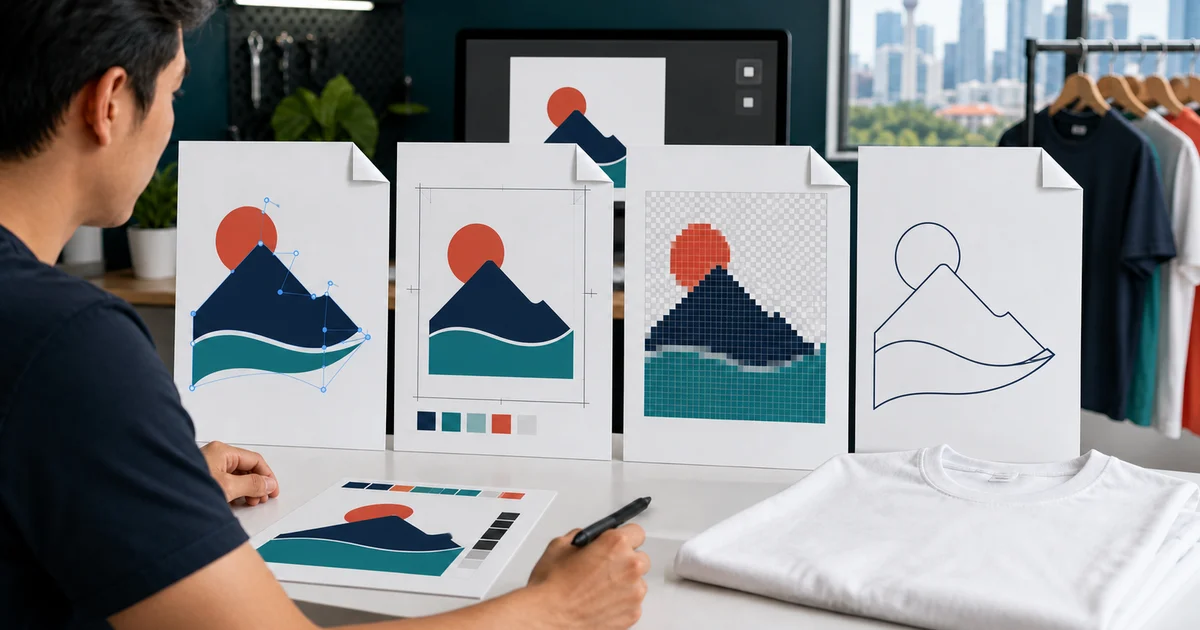
The short answer: use AI as the editable vector master, PDF as a reliable cross-platform handoff, PNG for high-resolution raster artwork with transparency, and SVG for simple scalable vectors when the printer accepts it. No format is best for every job; ask the printer what its production software needs.
For an important order, keep the source file and send one labelled production file plus a visual reference. A filename extension alone does not prove the artwork is print-ready.
Quick file-format decision table
| Format | Best use | Main strength | Main limitation |
|---|---|---|---|
| AI | Editable logos, text, colour separations and production changes | Preserves Illustrator artwork and editing data | Requires compatible software and careful linked-asset handling |
| Approved layout, proof and printer handoff | Preserves page appearance across systems and can contain vectors | May contain flattened or low-resolution raster content | |
| PNG | Photographs, painted graphics, gradients and DTF/DTG-style raster workflows | Lossless raster with transparent background support | Pixel-based and becomes soft if enlarged too far |
| SVG | Simple logos, icons and flat vector artwork | Scales paths cleanly and is widely viewable | Fonts, effects and embedded raster images need checking |
The chosen printing method, artwork and supplier software decide the final format.
When is AI the best source file?
AI is Adobe Illustrator’s native format. It is useful when the printer needs to:
- resize vector paths;
- adjust spot or process colours;
- separate artwork by print colour;
- move individual elements;
- outline or correct text; or
- create variants for different placements.
Adobe’s current save-artwork guidance recommends keeping artwork in AI while it is still being created, then exporting the required delivery format. It also explains options for embedding linked files and creating a PDF-compatible representation.
Before sending AI:
- include or embed linked images;
- convert final text to outlines when agreed, while retaining an editable master;
- remove unused hidden artwork;
- name artboards and versions clearly; and
- provide a PDF reference so the printer can compare appearance.
Do not assume every printer uses Illustrator or the same software version. Ask first.
Why is PDF often the safest handoff?
PDF can preserve fonts, images and layout in a file that is easy to view across platforms. Adobe describes PDF as effective for print workflows because a service provider can preflight, separate or output the artwork using different tools. Read Adobe’s PDF print-workflow guidance.
However, PDF does not automatically mean vector. A PDF can contain:
- scalable vector paths;
- live or outlined text;
- high-resolution raster images;
- low-resolution screenshots; or
- flattened transparency.
Ask the printer to confirm that the PDF retains the elements needed for its process. Use a print-quality export rather than an email-optimised smallest-file preset. Adobe specifically advises asking the print provider for its preferred output settings.
For shirt artwork, add crop marks or bleed only when the printer requests them. Unlike paper products, a chest logo is not normally trimmed at a page edge.
When is transparent PNG the right choice?
PNG is appropriate when the artwork is genuinely raster-based, including:
- photographs;
- hand-painted or textured illustrations;
- complex gradients and effects;
- full-colour transfers; and
- designs whose background must remain transparent.
Check the pixel dimensions at the final print width. A “300 DPI” label does not help if the file contains too few pixels for the intended centimetres. Ask the printer to preflight the actual file rather than enlarging it in a chat app or document.
Open the PNG on a dark and light background to confirm it has genuine transparency. A checkerboard shown inside the image itself is not transparency.
PNG is not the best master for a simple company logo when an editable vector source exists. Keep the vector master and export PNG only for the workflow that needs it.
When does SVG work well?
SVG is useful for simple logos, icons and clean flat artwork built from vector paths. Adobe includes SVG among formats that can preserve Illustrator data when the relevant editing option is selected, and its SVG export guidance notes that converting fonts to outlines preserves path definitions across viewers.
Before using SVG, check:
- whether the printer’s RIP or artwork software accepts it;
- whether fonts are outlined or reliably embedded;
- whether clipping masks, gradients and effects render correctly;
- whether any images inside the SVG are raster; and
- whether the page bounds match the visible artwork.
SVG is widely used on the web, but a print shop may still prefer PDF or AI for its established production workflow.
A new extension cannot repair weak artwork
Converting a small JPG or screenshot into AI, PDF or SVG does not recreate missing edges or detail. It may only place the same pixels inside a different container.
Ask these questions instead:
- Are the logo shapes true vector paths?
- Are raster images sharp at the final width?
- Are fonts available, embedded or outlined?
- Is the intended background transparent?
- Are colours defined for the printer’s workflow?
- Does the visible artwork fit the approved print dimensions?
The general artwork preparation guide covers resolution, colour and proof checks, while the print-size guide helps set the finished dimensions.
Match the file to the printing method
| Printing need | Useful starting file | Why |
|---|---|---|
| Simple screen-printed logo | AI or print-ready PDF | Editable vector shapes help sizing and colour separation |
| Full-colour DTF or DTG artwork | High-resolution transparent PNG or printer-approved PDF | Raster detail and transparency can be preserved |
| Sublimation photograph or pattern | High-resolution raster file or approved PDF | Pixel detail and colour workflow matter more than a vector extension |
| Embroidered logo | AI, PDF or SVG as source reference | The logo still needs to be digitised into the machine format for the selected garment |
These are starting points. The supplier’s equipment, RIP, embroidery software and quality-control process determine the accepted production file.
Send a controlled final package
A useful package contains:
- one editable master such as AI or the original Canva source;
- one printer-approved production file;
- one PDF reference showing the expected appearance;
- a transparent PNG when the method needs raster artwork;
- final width and placement in centimetres;
- colour references and garment colour; and
- a version note stating which file is approved.
Avoid sending five competing “final” versions. If a printer changes the file, request an updated proof and archive the approved production version for reorders.
If you are designing in Canva, follow the Canva t-shirt artwork workflow. Then request comparable quotations through Baju Printz and ask each supplier to identify the exact file it will print.
Frequently asked questions
What is the best file format for a t-shirt logo?
An editable vector AI file is an excellent master when the printer supports Illustrator, while a correctly exported PDF is often the most portable production handoff. Confirm the supplier's requested format before sending.
Is every PDF a vector file?
No. A PDF is a container that can hold vector paths, text and raster images. Saving a low-resolution image inside a PDF does not convert it into sharp vector artwork.
When should I send a transparent PNG?
Send a transparent PNG for photographs, painted artwork, gradients or other raster designs when it has enough pixels at the final print size. Check that transparency is genuine and the background is not a white rectangle.
Can an SVG contain a low-resolution image?
Yes. SVG is a vector format, but it can include embedded or linked raster images. Inspect the contents instead of assuming the SVG extension makes every element infinitely scalable.
Ready to compare suitable printers?
Get 5 Free Quotes