
How Many Colours Can Silk Screen Printing Use?
Learn how screens, spot colours, white underbases, CMYK and press capacity determine the practical colour limit for silk-screened shirts.
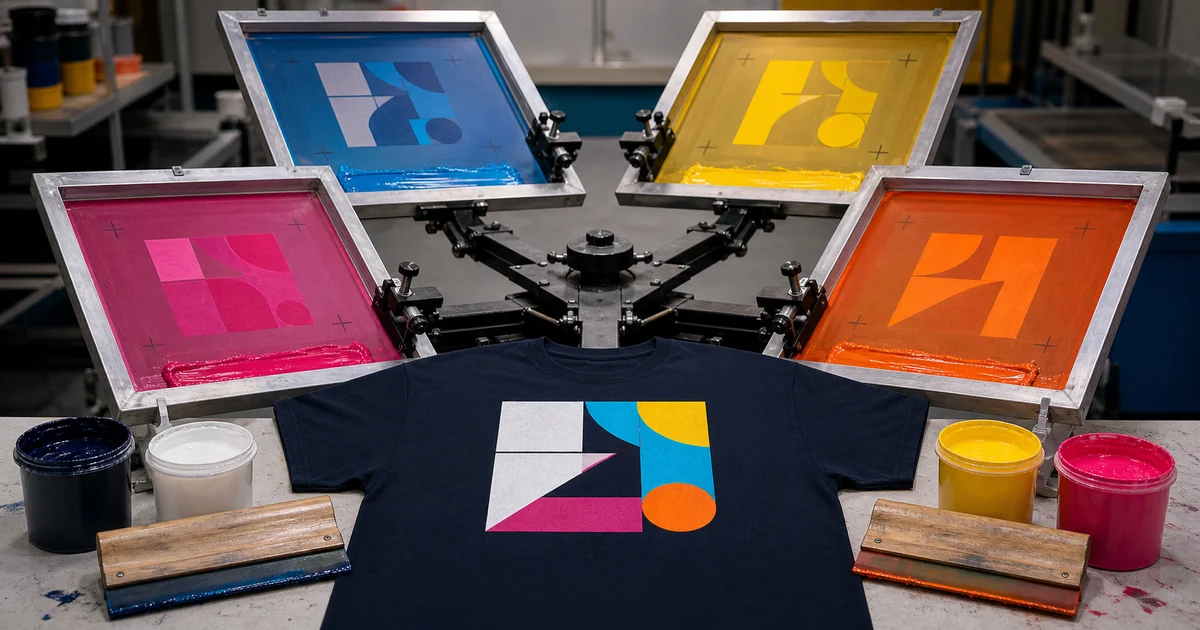
The short answer: silk screen printing has no single colour maximum. For spot-colour artwork, each ink normally needs its own screen and press head; a white underbase on a dark shirt may use another. The real limit is the printer’s equipment, colour-separation plan, registration difficulty, fabric, quantity and budget.
A design showing twelve colours on a monitor is not automatically a twelve-screen job. Some shades can be created from halftones or overlapping process inks, while duplicate shades may be consolidated. Ask the printer to review the production artwork before treating the colour count as final.
Quick screen-count examples
| Artwork request | Possible screen plan on a light shirt | Possible plan on a dark shirt | Important note |
|---|---|---|---|
| One solid spot colour | 1 | 1 or 2 | Dark fabric may need a white underbase for opacity |
| Three solid spot colours | 3 | 3 or 4 | The underbase can use an additional screen |
| CMYK process image | 4 | Varies | Dark fabric may need a specialised base or highlight-white plan |
| Simulated-process illustration | Varies by separation | Usually includes a base strategy | Printer chooses the ink set for the artwork and fabric |
| Metallic or other special ink | Additional screen where used | Additional screen where used | Confirm compatibility and curing with the supplier |
These are planning examples, not a quotation. A printer may combine, omit or add separations after examining the file and shirt.
Count ink separations, not the colours on your screen
In spot-colour screen printing, a design is separated into individual ink layers. ScreenPrinting.com’s current production guide explains that each colour requires its own screen and that each print head holds a screen.
This means a logo using navy, orange and green will normally need three spot-colour separations. A lighter orange made by printing a halftone tint of the same orange ink may stay on that orange screen; Adobe’s current spot-colour guidance confirms that tints of one spot colour can share the same separation.
However, a visually similar orange defined as a separate spot ink can create another separation. Before requesting prices, remove accidental duplicate swatches and ask the printer which colours will be physically mixed as inks.
Add a white underbase when the garment needs it
Bright ink printed directly onto black or navy fabric can look dull because the shirt colour influences it. A white underbase creates a lighter foundation beneath the visible colours.
That base normally counts as another screen and print head. ScreenPrinting.com’s underbase example shows a two-colour design on navy being planned as three print layers once white is included.
Do not assume every dark-shirt design needs the same white layer. The printer may adjust the underbase for ink type, fabric, desired vintage effect and artwork detail. Ask for two numbers in the quotation:
- visible artwork colours; and
- total production screens, including underbase and special layers.
For more context on dark garments, read the black t-shirt printing guide.
Can four CMYK inks create many colours?
Yes, when the printer offers four-colour process screen printing and the artwork suits it. Cyan, magenta, yellow and black are separated into halftone dots that visually combine into a much wider range of hues.
Adobe’s official colour-separation guide describes four plates for process artwork regardless of how many composite colours appear in the image. The principle also helps explain garment process printing, but the screen mesh, ink, fabric and colour-separation settings are specific to the printer.
CMYK does not mean every monitor colour will match perfectly. It can also be less suitable when one exact corporate spot colour matters more than photographic range. Compare:
- spot colours for clean logos, limited palettes and controlled premixed inks;
- CMYK process for suitable photographic or continuous-tone work; and
- DTF or DTG when the quantity, fabric and artwork make full-colour screen setup impractical.
The silk screen, DTF and DTG comparison can help you shortlist the method.
What is simulated-process screen printing?
Simulated process uses selected spot inks and halftones to reproduce detailed artwork, often on coloured garments. It is not restricted to the four CMYK inks. The separator chooses an ink set, underbase and highlight strategy that fits the image and press.
This can produce complex results, but it requires capable separation, stable registration and enough press heads. Ask to see a sample made with a similar number of separations on a similar fabric. A digital mockup alone cannot prove dot detail, ink opacity or alignment.
What limits the practical colour count?
The press is only one constraint. Check all six:
- Print heads: each production colour or layer needs an available screen position.
- Registration: every screen must align with the others; fine multi-colour detail is less forgiving.
- Flash and cooling space: some layers must be gelled before the next ink, affecting press capacity and speed.
- Garment colour and fabric: opacity, dye behaviour and surface texture change the ink plan.
- Print positions: front, back and sleeves are separate setups even when they reuse an ink colour.
- Order economics: every added separation increases preparation and approval work, which matters more on short runs.
This is why two printers can quote different colour limits for the same visible design. One may have a larger automatic press; another may recommend reducing spots or using a digital transfer.
Does adding colour always improve the design?
No. A controlled two- or three-colour palette can be clearer, cheaper to set up and easier to repeat. Before approving more separations, ask:
- Can two nearly identical shades use one ink?
- Can a tint be made with halftones of an existing spot colour?
- Is a gradient essential, or can it be simplified?
- Does the shirt colour already provide one part of the design?
- Is one brand spot colour more important than photographic range?
- Would DTF be more suitable for this quantity and detail?
Do not simplify a protected brand logo without approval. When colour accuracy matters, use the Pantone, CMYK and RGB file guide and approve a physical sample.
Ask for a separation summary before paying
Send the editable artwork, shirt model and colour, fabric, quantity, finished print dimensions, positions, critical spot-colour references and required date. Then ask the printer to state:
- the proposed print method;
- number of visible colours;
- total screen count;
- whether an underbase or highlight white is included;
- any special ink layer;
- setup charges; and
- sample or strike-off approval process.
Baju Printz lets you send one brief to relevant Malaysian printers or browse suppliers by state. Compare the same screen plan—not just the lowest unit price—before choosing a quotation.
Frequently asked questions
What is the maximum number of colours in silk screen printing?
There is no universal maximum. A spot-colour design normally needs one screen and press head per ink, so the practical limit depends on the printer's equipment, any underbase or special layers, registration difficulty and budget.
Does a white underbase count as a silk-screen colour?
Usually yes for production planning because the white underbase normally requires its own screen and print head. A three-colour design on a dark shirt may therefore need four screens when white is printed beneath it.
Can four-colour CMYK screen printing create a full-colour image?
CMYK process printing can reproduce many perceived colours by combining cyan, magenta, yellow and black halftones. Garment colour, ink system, separation quality and any required underbase still affect whether that workflow suits the job.
Does every extra silk-screen colour increase the price?
It usually adds separation, screen preparation, ink handling, registration and test-print work, so it can increase setup cost. The effect on the final price depends on quantity, print positions, garment colour and the supplier's equipment.
Ready to compare suitable printers?
Get 5 Free Quotes